;}.cls-2{fill:%2358d687;}.cls-3{fill:url(%23Degradado_sin_nombre_10);}.cls-4{fill:url(%23Degradado_sin_nombre_31);}.cls-5{fill:%238030d1;}.cls-6{fill:url(%23Degradado_sin_nombre_23);}%3c/style%3e%3clinearGradient%20id='Degradado_sin_nombre_17'%20x1='129.39'%20y1='83.35'%20x2='56.4'%20y2='162.54'%20gradientUnits='userSpaceOnUse'%3e%3cstop%20offset='0'%20stop-color='%23287d8c'/%3e%3cstop%20offset='1'%20stop-color='%2350b5db'/%3e%3c/linearGradient%3e%3clinearGradient%20id='Degradado_sin_nombre_10'%20x1='449.01'%20y1='190.97'%20x2='266.02'%20y2='78.2'%20gradientUnits='userSpaceOnUse'%3e%3cstop%20offset='0'%20stop-color='%23ffe286'/%3e%3cstop%20offset='1'%20stop-color='%23ffcd1d'/%3e%3c/linearGradient%3e%3clinearGradient%20id='Degradado_sin_nombre_31'%20x1='99.7'%20y1='309.69'%20x2='146.19'%20y2='485.35'%20gradientUnits='userSpaceOnUse'%3e%3cstop%20offset='0.01'%20stop-color='%23ff9464'/%3e%3cstop%20offset='1'%20stop-color='%23b3553a'/%3e%3c/linearGradient%3e%3clinearGradient%20id='Degradado_sin_nombre_23'%20x1='547.05'%20y1='208.96'%20x2='252.56'%20y2='438.86'%20gradientUnits='userSpaceOnUse'%3e%3cstop%20offset='0'%20stop-color='%23ff7da1'/%3e%3cstop%20offset='1'%20stop-color='%23f20b4f'/%3e%3c/linearGradient%3e%3c/defs%3e%3ctitle%3efavicon%3c/title%3e%3cg%20id='_Group_'%20data-name='<Group>'%3e%3cg%20id='_Group_2'%20data-name='<Group>'%3e%3cg%20id='_Group_3'%20data-name='<Group>'%3e%3cpath%20id='_Path_'%20data-name='<Path>'%20class='cls-1'%20d='M232.54,165.43a124.47,124.47,0,0,1-106.95,60.76h0A101.77,101.77,0,0,1,23.82,124.41V0L132.31,95.94A517.46,517.46,0,0,0,232.54,165.43Z'/%3e%3cpath%20id='_Path_2'%20data-name='<Path>'%20class='cls-2'%20d='M250,0V101.78a123.87,123.87,0,0,1-17.46,63.65A517.46,517.46,0,0,1,132.31,95.94L23.82,0Z'/%3e%3cpath%20id='_Path_3'%20data-name='<Path>'%20class='cls-3'%20d='M476.18,226.19a518.87,518.87,0,0,1-243.64-60.76A123.87,123.87,0,0,0,250,101.78V0A226.12,226.12,0,0,1,476.18,226.19Z'/%3e%3cpath%20id='_Path_4'%20data-name='<Path>'%20class='cls-4'%20d='M232.54,334.57a517.71,517.71,0,0,0-100.23,69.54L23.82,500V375.59A101.77,101.77,0,0,1,125.59,273.81h0A124.47,124.47,0,0,1,232.54,334.57Z'/%3e%3cpath%20id='_Path_5'%20data-name='<Path>'%20class='cls-5'%20d='M250,398.22V500H23.82l108.49-95.89a517.71,517.71,0,0,1,100.23-69.54A123.87,123.87,0,0,1,250,398.22Z'/%3e%3cpath%20id='_Path_6'%20data-name='<Path>'%20class='cls-6'%20d='M476.18,273.81A226.12,226.12,0,0,1,250,500V398.22a123.87,123.87,0,0,0-17.46-63.65A518.87,518.87,0,0,1,476.18,273.81Z'/%3e%3c/g%3e%3c/g%3e%3c/g%3e%3c/svg%3e)
Learning pathIntermediate → AdvancedHCI
Human Computer Interaction: Tasks, Principles and Usability Testing
This path is for designers with some HCI background who want to deepen their practice. It moves from task analysis and design principles to lectures on colour and to talks on engaging users with new technologies. You will combine watching with hands-on practice, planning and running a usability test.
4 modules · 9 steps · ~5.5 hrs · 1 Skill Lab · 6 videos · 1 resource · 1 critique
By the end of this path, you’ll be able to
- Analyse the tasks users perform and show them with storyboards
- Apply established design principles to interface decisions
- Plan and run a usability test with a small group of users
- Evaluate colour choices against task and user needs
Modules
- Module 1
Core HCI Lectures
Three university lectures cover task analysis, storyboards, design principles and colour evaluation.
- VideoKhawaja Tahir || HCI || Lecture 24 || Color || Color content || Evaluation DesignKhawaja Science Academy37 minStarts with colour evaluation, a practical base for the rest of the path.
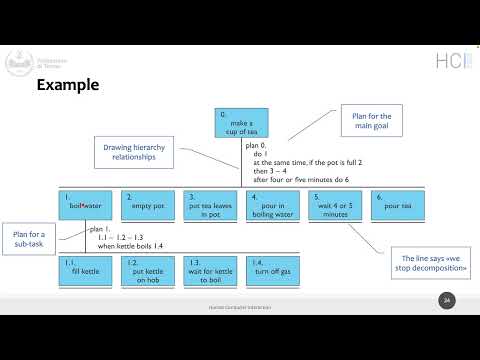
- VideoHCI2022-L07: Task Analysis (part II) and storyboardsLuigi De Russis~1 hrBuilds on task analysis by showing how storyboards capture user tasks.
- VideoHCI2022-L12: Design Principles.Luigi De Russis~1 hrCloses the foundations with design principles that guide later decisions.
- Module 2
Engaging Users Beyond the Screen
Advanced talks look at IoT, medical device design, and sensing input for XR interfaces.
- VideoDesigning Bilingual Workshop of Medical Devices: Human Factors in Healthcare Settings in WUD ChinaDFDraw Lab | 开垦设计3 minA case from medical device design that tests the principles in a demanding setting.
- VideoProfessor Yvonne Rogers - Designing IoT for Engaging UsersUX Craft South Africa43 minConsiders how IoT and AI take users out of the loop, a useful advanced framing.
- VideoFuture Directions for XR Interactions with Advanced Sensing Techniques and Haptic Design FrameworksMicrosoft Research50 minLooks ahead to XR input, extending interaction thinking beyond the screen.
- Module 3
Test and Plan Your Own Study
Plan a usability test, then run a short think-aloud session to see how real users work.
- Module 4
Next Steps After This Path
No live session or follow-on path is scheduled for this topic yet.